Platform This page is built in the tool it describes.
Pages, languages, images and forms for Norin IT, Polarstigen and GnosjöBo all come out of one platform. Change the look, show the blocks, read the page as code.
The control in the bottom left works on every page.
Look
A look is data, not a new site.
Colours, typefaces, corners and motion are named values. Change them, and everything that reads them changes along with them.
Lasts until you close the tab. Only you see it.
This site's own look: a warm dark ground, one orange and square corners.
Body text contrast: 15.7:1. Muted text: 10.2:1.
This week's deliveries
ActiveThree orders are waiting to be packed. The next truck leaves at two.
Everything that belongs to the project, in one place.
Saved
The change shows at once.What changed
Source: NIT.UI-norinit-theme packages/themes/norinit/tokens.css @ 374831e
Nothing changes. This is the site's own look.
Three tiers: a design package per installation, a database row per site, and the site's own stylesheet when it needs more than values. Gislatorp is just a row; CE Formula, Polarstigen and GnosjöBo have their own packages or stylesheets.
Structure
The page, taken apart.
Every page has the same four layers: the shell around it, a page type, the blocks in order, and fragments shared between pages. Turn on the block view and they're drawn on the page you're reading.
- Shell
- Header, footer and menus. The same on every page.
- Page type
- Decides the page's fields and what frames the blocks. This page: Showcase page
- Blocks
- The sections in order. Each block has its own fields in the editor.
- Fragment
- A piece that is stored once and shown on several pages.
The blocks on this page, in order
- Page hero
The page's opening: label, large heading, subtitle, buttons and an image.
- Theme switcher
Re-skins a specimen or the whole site and lists the values that changed.
- Page anatomy
Takes the page apart into shell, page type, blocks and fragments.
- Statement
A statement with a label in the margin, as a band or as proof.
- Fragment
Content that is stored once and shown on several pages.
- Languages
The page's texts in Swedish and English side by side, and how many fields are translated.
- Fields
A project's fields and where on the site each one ends up.
- Page as code
This page as the file we change, review and publish.
- Cache
Which part of the chain answered this visit, and how fast.
- Platform
A heading, a wide screenshot and the modules as cards.
- Clips
Short clips from the editor.
- Statement
A statement with a label in the margin, as a band or as proof.
- Contact form
A short form. The answers land in the inbox in the editor.
Draws a frame and a name around every block, on every page until you turn it off.
Fragment
The section below appears on five pages but is stored once per language. Change it, and all five change.
Languages
Two languages, one field at a time.
Every text on this page has a Swedish original. The editor keeps count: when the Swedish changes, the English is flagged until someone has gone through it.
The page
- Page title
- English: Platform
- Swedish: Plattformen
- Search engine description
- English: The platform behind Norin IT, Polarstigen and GnosjöBo. Change the look, see the blocks and read the page as code: a block CMS shown on itself.
- Swedish: Plattformen bakom Norin IT, Polarstigen och GnosjöBo. Byt utseende, se sidans block och läs den som kod: block-CMS, två språk och cache, visat på sig själv.
Platform
Show the section: Platform- Heading
- English: This page is built in the tool it describes.
- Swedish: Den här sidan är byggd i verktyget den handlar om.
- Subheading
- English: Pages, languages, images and forms for Norin IT, Polarstigen and GnosjöBo all come out of one platform. Change the look, show the blocks, read the page as code.
- Swedish: Sidor, språk, bilder och formulär för Norin IT, Polarstigen och GnosjöBo kommer ur samma plattform. Byt utseende, visa blocken, läs sidan som kod.
-
- Heading
- English: A look is data, not a new site.
- Swedish: Ett utseende är data, inte en ny sajt.
Structure
Show the section: Structure- Heading
- English: The page, taken apart.
- Swedish: Sidan, isärplockad.
Fragment
Show the section: Fragment- Heading
- English: The section below appears on five pages but is stored once per language. Change it, and all five change.
- Swedish: Stycket nedanför står på fem sidor men lagras en gång per språk. Ändrar vi det, ändras det på alla fem.
Languages
Show the section: Languages- Heading
- English: Two languages, one field at a time.
- Swedish: Två språk, ett fält i taget.
Fields
Show the section: Fields- Heading
- English: Projects are data.
- Swedish: Uppdragen är data.
As code
Show the section: As code- Heading
- English: The page as code.
- Swedish: Sidan som kod.
Cache
Show the section: Cache- Heading
- English: Ready before you ask.
- Swedish: Färdig innan du frågar.
Editor
Show the section: Editor- Heading
- English: The editor.
- Swedish: Redigeraren.
Films
Show the section: Films- Heading
- English: What the work looks like.
- Swedish: Så ser arbetet ut.
The case
Show the section: The case- Heading
- English: Polarstigen and GnosjöBo are built on the same platform.
- Swedish: Polarstigen och GnosjöBo är byggda på samma plattform.
Send an inquiry
Show the section: Send an inquiry- Heading
- English: Want a site on the platform?
- Swedish: Vill ni ha en sajt på plattformen?
Fields
Projects are data.
Every project has fields for client, type, areas, technology, year and status. Pick a project and see where each field ends up on the site.
Page fields of The property platform
- Client
- Polarstigen, GnosjöBo Fastigheter Shows in:The cards on Work · The facts row on the case page
- Type
- Client work Shows in:The cards on Work
- Areas
- Property Shows in:The filters on Work · The facts row on the case page
- Technology
- SvelteKit, .NET, TypeScript, PostgreSQL, Tailwind CSS, Docker, Kubernetes Shows in:
- Years
- 2026 Shows in:The cards on Work · The facts row on the case page
- Status
- Pilot Shows in:The facts row on the case page
- Order
- 4 Shows in:Next project
The filters on Work
The facts row on the case page
- Client
- Polarstigen, GnosjöBo Fastigheter
- Years
- 2026
- Status
- Pilot
- Areas
- Property
The cards on Work
The filters on Work and the next-project link are worked out from the fields. Nobody keeps those lists in order by hand.
Content as code
The page as code.
Every page is also a file. We change the file, review the change and ship it. Here's this page.
Path in the repo:content/norinit/en/products/platform.json
meta: "meta": { … },
ni-page-hero, id hero: { "id": "hero", "type": "ni-page-hero", … },
ni-platform-themes, id themes: { "id": "themes", "type": "ni-platform-themes", … },
ni-platform-anatomy, id anatomy: { "id": "anatomy", "type": "ni-platform-anatomy", … },
ni-statement, id promise-note: { "id": "promise-note", "type": "ni-statement", … },
fragment, id promise: { "id": "promise", "type": "fragment", … },
ni-platform-languages, id languages: { "id": "languages", "type": "ni-platform-languages", … },
ni-platform-fields, id fields: { "id": "fields", "type": "ni-platform-fields", … },
ni-platform-json, id code: { "id": "code", "type": "ni-platform-json", … },
ni-platform-cache, id cache: { "id": "cache", "type": "ni-platform-cache", … },
ni-case-platform, id editor: { "id": "editor", "type": "ni-case-platform", … },
ni-platform-reel, id reel: { "id": "reel", "type": "ni-platform-reel", … },
ni-statement, id proof: { "id": "proof", "type": "ni-statement", … },
ni-contact, id contact: { "id": "contact", "type": "ni-contact", … }
Fetch the same file yourself
curl https://staging.norinit.solutions/en/products/platform.json
Exported from the published page; the file in our repo may have hand-written keys.
Delivery
Ready before you ask.
Pages are stored ready to send. When we change something, only those pages are cleared.
- Browser Page changes without a new page load
- Page cache Finished HTML, kept per page and language
- Rendering The page is built from blocks and data
- API cache API answers, kept per site
- Database PostgreSQL
- This load
Page changes inside the site only fetch data. That never goes through the page cache.
The editor.
You write straight onto the page. What you see is what gets published.
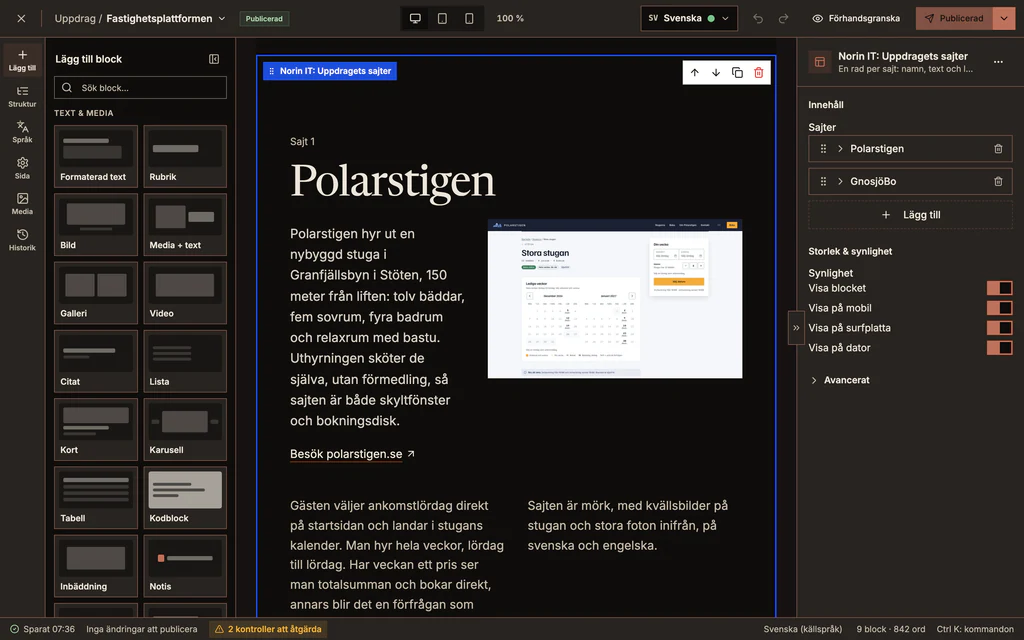
The canvas
A page is built from blocks you add, move and write in directly, in the site's own look.
Page checks
Page checks find heading levels, alt texts and broken links while you write, and take you to the right spot.
Translate view
One field at a time with the source beside it. When the Swedish changes, the English is flagged. XLIFF out and in for translators with their own tools.
Focal point
Mark what in the picture must stay visible and it's cropped right in every format. Alt text is written once per language.
Version history
Every save becomes a version with who and when. Any of them can be previewed and brought back.
Command palette
Ctrl+K finds pages, images, fragments, form responses and users from any view.
Films
What the work looks like.
Short recordings from the editor, with demo data.
Built on the platform
Polarstigen and GnosjöBo are built on the same platform.
Want a site on the platform?
Tell us what the site needs to do and who will be writing in it, and we'll come back with how the platform fits.